
ReCrystallize Pro Support Frequently Asked Questions
Unlocking ReCrystallize Pro Fails
- Article ID: 0001
- Date Created: January 24, 2003
- Last Modified: October 11, 2011
- Applies to: ReCrystallize Pro Web Wizard for Crystal Reports versions 4.0, 5.0, 5.1, 10
Synopsis:
When attempting to unlock ReCrystallize Pro, the application stops responding.
More Information:
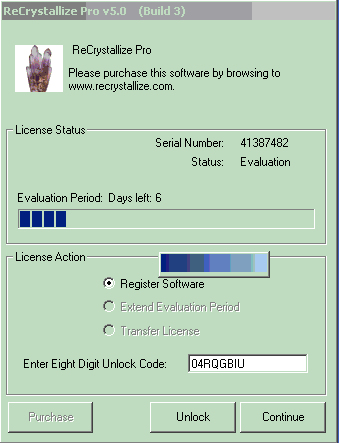
After entering an Unlock Code and clicking Unlock in ReCrystallize Pro to activate the product license, the program may stop responding. A blue bar (window title bar) may appear as shown below. CPU utilization may approach 100%. There is no apparent way to close the application.
Solution:
Open Windows Task Manager, look for a process ending in .tmp such as “ins132.tmp” and end the process.
Verify that the correct unlock code is being used for the given version, build, and serial number. Note that each serial number requires a different unlock code. To verify that the correct unlock code is being used, resubmit the version, build and serial numbers at http://www.recrystallize.com/merchant/unlock.htm with a brief explanation. An email message will be sent in reply verifying the unlock code or providing the correct unlock code. If the unlock code is correct, verify that the unlock code has been entered correctly, paying particular attention to differentiate between zero and letter O.
If the unlock code is correct, contact ReCrystallize Software for a new executable with a different Build number. Usually a different Build will unlock properly.
Status:
This is a known issue with the “wrapper” software used to unlock ReCrystallize Pro versions 4.x, 5.x, and 10.x. It affected only a small percentage of customers during the unlocking process and does not otherwise affect the operation of the software. This issue does not occur in ReCrystallize Pro versions 11 and later.