

Report Miner Suite
Report Miner Suite - $369
Report Miner Suite provides complete documentation, version control, and a database cross reference for your Crystal Reports.
Product Overview
Report Miner saves hours by showing at a glance
- a Crystal Report's design and layout
- what has changed between two versions of a Crystal Report
- how one Crystal Report differs from another
- a list of your Crystal Reports, including the last revision date
- which Crystal Reports will be affected by a change to your database.
"The Report Miner Suite of tools is absolutely terrific! I purchased the license a few weeks ago and now have the full capabilities of the product. It has already save me 10 times the cost of the product! I am truly pleased with this purchase."
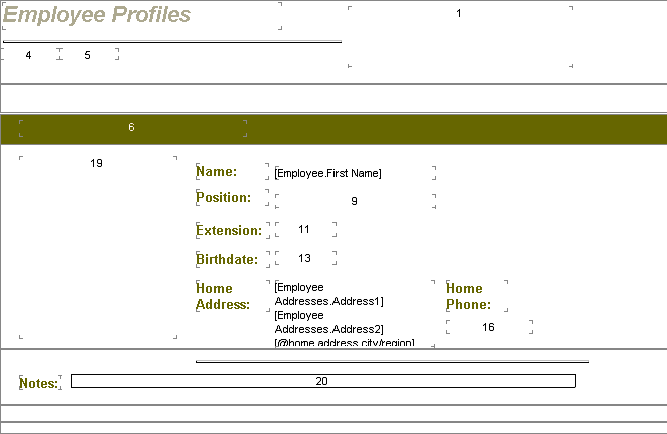
Jim Christian, President, Witan Consulting, Inc., Byhalia, MississippiSample Report Layout included in Extract documentation. (Click for Extract details.)
For the end user
The Report Miner tools can be used without Crystal Reports software by end users who need to understand how a report is constructed: what tables are used, how the formulas work, and so on.
For the developer
The Report Miner tools provide documentation of many critical elements of your Crystal Reports designs which were previously unavailable from any source, short of examining each report in detail using the Crystal Reports design tools. The data provided by Report Miner can be used "as-is" or incorporated into your existing system documentation.
Report Miner Suite includes
Extract mines your Crystal Reports ".rpt" file and generates finished report design documentation in Microsoft Word format. The Word document includes a report image cross-referenced to the source fields. A text file can also be saved and stored in your existing version control system.
Extract creates a database file of all report elements which can be used for customized reporting.
RptDiff is useful for identifying design changes between two versions of the same Crystal Report or design differences between two different Crystal Reports.
SiteSurvey provides a high-level listing of Crystal Report files, including title, author, revision number, total edit time, date last saved, date last printed and various metrics. This is helpful in organizing your reports and identifying possible duplicates or outdated versions.
XRef identifies which tables are used in a Crystal Report and which reports reference a specific table. This provides a useful cross-reference between reports and tables used, including tables in any subreports. Table alias and specific table name and database information are available along with the report's record selection formula.
 Download a trial version of Report Miner Suite.
Download sample documentation created by Report Miner Extract in Word format.