

cViewMANAGER
A powerful, flexible scheduler for updating and distributing your Crystal Reports.
Note: We are currently unable to provide new licenses for the
cViewMANAGER scheduler.
Please try the similar, newer
CrystalKiwi Scheduler instead.
Product Overview
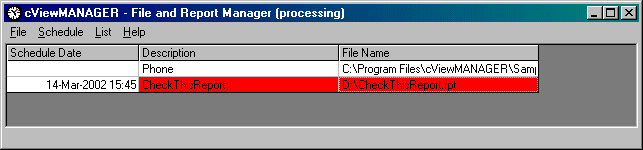
The cViewMANAGER Crystal Reports scheduler automates the tedious, time-consuming process of updating of your Crystal Reports and sending them to your users. cViewMANAGER refreshes your Crystal Reports, using up-to-date data from your database, on the schedule you select — hourly, daily, weekly or monthly. cViewMANAGER can email your Crystal Report as an attachment, print the Crystal Report on any system printer, or save the refreshed Crystal Report file in a variety of formats including Excel an PDF. Report parameters can be used with cViewMANAGER so that the same report (rpt file) produces different output for different schedule items or users.
cViewMANAGER runs as a Windows application, making it simple to set up and use. For the reports to be run when scheduled, a user must be logged in to Windows and have the cViewMANAGER program running. The cViewMANAGER program can be minimized and the computer can be locked if desired. If you prefer a Crystal Reports scheduler that runs in the background as a Windows Service, without requiring any user to be logged in, consider cViewSERVER.
cViewMANAGER may also be used in combination with ReCrystallize Pro to allow even lengthy, complex Crystal Reports to display instantly on the web.
Key Features
Using cViewMANAGER you can schedule reports to run at a specific date and time or at regular intervals: Hourly, Daily, Business Days, Weekly, Monthly, or Last Day of Month.
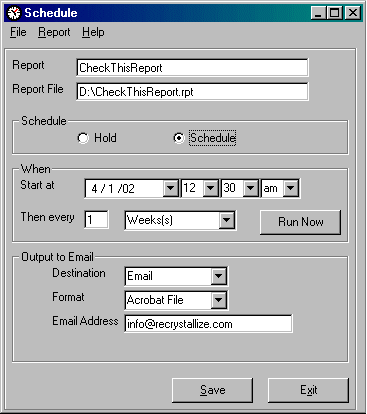
- The Business Calendar feature enables you to schedule reports only on business days (Monday-Friday or Monday-Saturday) or during business hours (such as every 45 minutes between 9am and 4pm). You can also specify a list of holidays on which reports will not run.
- The Dynamic Dates features allows you to automatically set date parameters in a report based on the current date. An example would be a scheduled report that always uses the current accounting period start and end dates in the report. Calendar support includes calendar months, 4 week periods and 4-4-5 week accounting.
- Export file formats include Crystal Reports (.rpt), Microsoft Word (.doc), Rich Text (.rtf), Excel (.xls), Comma Separated Values (.csv), HTML (.htm), and Portable Document Format (.pdf).
- Date Stamping allows you to use the date and time in the filename of the saved report output. Simply include %d, %t or %h in the disk file name to include the date, time or hour the report was processed.
- Reports may be sent by email using any of the available export formats.
- Full HTML email support allows cViewMANAGER to send a report as HTML in the body of an email message, eliminating the need to open attachments.
- Direct SMTP support enables cViewMANAGER to work with virtually any
email system. SMTP Spooling allows cViewMANAGER to queue reports
when the SMTP server is busy or unavailable, ensuring all reports are delivered.
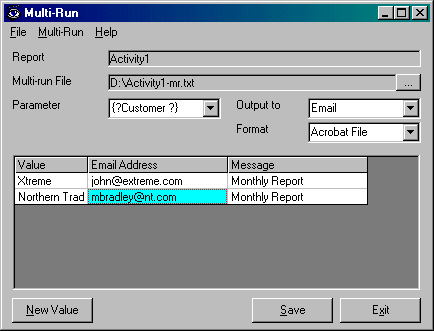
- Multi-run feature allows the same report to be run multiple times with different input parameters and/or destinations. For example, this would allow running the same Crystal Report so that it includes different data and a different destination email address for each salesperson -- all with one scheduled event. The Multi-run control file is editable text and may be shared among different reports.
- List management allows you to maintain an external list of values or destinations for a group of scheduled reports. For example, you can use a List to send one report to several printers -- just specify the List file as the output destination.
- cViewMANAGER's printer control feature allows you to control the number of copies and page orientation when printing reports.
- cViewMANAGER works with reports and subreports that require secure database
login. cViewMANAGER stores database user names and passwords in an
encrypted file on the server, allowing these reports to run unattended.
Reports and subreports that log in to multiple databases using different
credentials are supported.
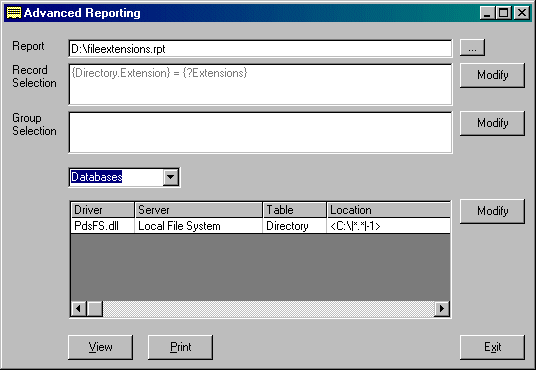
- Advanced Reporting feature allows you to modify a report's formula fields (including Record Selection and Group Selection) and database locations.
- Exception handling allows you to control what happens when no records are retrieved for a report. Possible actions include sending an empty report, not sending anything, or sending an error notification to an administrator.
- In addition to Crystal Reports, cViewMANAGER allows scheduled execution of batch files, executables, and other commands.
cViewMANAGER Single Workstation/Server License — $550
cViewMANAGER Upgrade Protection - 1 Year — $99
Provides upgrades to new cViewMANAGER versions for one
year.
This pricing is available with new license purchases and for
renewals of non-expired protection.
Please contact
us for renewal pricing if your protection period has expired.
Purchase
multiple years of upgrade protection by increasing the quantity in the shopping
cart.
 Download a trial version of cViewMANAGER version 11 (63.3 MB).