

cViewSERVER
Automatically refresh and deliver your Crystal Reports on schedule using a Windows Service.
Note: We are currently unable to provide new licenses for the
cViewSERVER scheduler.
Please try the similar, newer
CrystalKiwi Scheduler instead.
Product Overview
The cViewSERVER Crystal Reports scheduler automatically delivers reports to your users on a schedule you select — daily, weekly, or monthly. Reports can be emailed or saved to disk in a variety of different formats including Excel and PDF. cViewSERVER retrieves the latest data from your databases to update your reports. It accepts report parameters so one report can create different results for different users.
cViewSERVER installs and runs as a Windows Service. It runs in the background and does not require a user to be logged in to Windows in order to process reports on schedule. The cViewSERVER service can be set to start automatically whenever Windows starts, so the report schedule will continue to run without manual intervention even if the computer is rebooted. Running as a service offers important benefits but can make the initial setup of cViewSERVER can be more involved than the cViewMANAGER scheduler for Crystal Reports which runs as a Windows application.
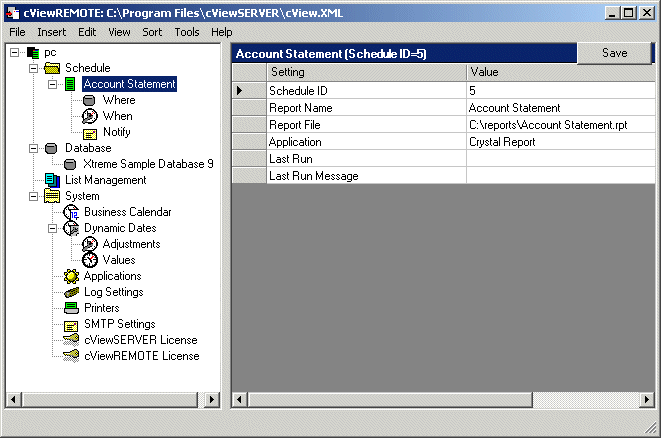
cViewSERVER includes one copy of the cViewREMOTE schedule management client. cViewREMOTE is installed with cViewSERVER and acts as the user interface to the report schedule. It allows configuration of data sources, report parameters, and output destinations. Additional cViewREMOTE licenses may be purchased to allow schedule management from remote PCs.
cViewSERVER may also be used in combination with ReCrystallize Pro to allow even lengthy Crystal Reports to display instantly on the web.
Key Features
Scheduling
- cViewSERVER can schedule reports to run at a specific date and time or at regular intervals of minutes, hours, days, weeks, or months.
- The Business Calendar feature enables you to schedule reports only on business days (Monday-Friday or Monday-Saturday) or during business hours (such as every 45 minutes between 9am and 4pm). You can also specify a list of holidays on which reports will not run.
- The Dynamic Dates features allows you to automatically set date parameters in a report based on the current date. An example would be a scheduled report that always uses the current accounting period start and end dates in the report. Calendar support includes calendar months, 4 week periods and 4-4-5 week accounting.
- Each report in the schedule shows last run time, last run message, and next run time.
- In addition to Crystal Reports, cViewSERVER allows scheduled execution of batch files, executables, and other commands.
- cViewSERVER provides web accessible status and log pages.
- Notification messages may be set for successful and/or unsuccessful report completion.
Report Output
- Export file formats include Crystal Reports (.rpt), Microsoft Word (.doc), Rich Text (.rtf), Excel (.xls), HTML (.htm), and PDF (.pdf).
- Date Stamping allows you to use the date and time in the filename of the saved report output. Simply include %d, %t or %h in the disk file name to include the date, time or hour the report was processed.
- Reports may be sent by email using any of the available export formats.
- Full HTML email support allows cViewSERVER to send a report as HTML in the body of an email message, eliminating the need to open attachments.
- Direct SMTP support enables cViewSERVER to work with virtually any email system. SMTP Spooling allows cViewSERVER to queue reports when the SMTP server is busy or unavailable, ensuring all reports are delivered.
- cViewSERVER's printer control feature allows you to control the number of copies and page orientation when printing reports.
Report Input
- cViewSERVER supports discrete and multi-value report parameters.
- The Multi-run feature allows the same report to be run multiple times with different input parameters and/or destinations. For example, this would allow running the same Crystal Report so that it includes different data and a different destination email address for each salesperson -- all with one scheduled event. The Multi-run control file is editable text and may be shared among different reports.
- List management allows you to maintain an external list of values or destinations for a group of scheduled reports. For example, you can use a List to send one report to several printers -- just specify the List file as the output destination.
- cViewSERVER works with reports and subreports that require secure database login. cViewSERVER stores database user names and passwords in an encrypted file on the server, allowing these reports to run unattended. Reports and subreports that log in to multiple databases using different credentials are also supported.
Download cViewSERVER scheduler for Crystal Reports
cViewSERVER version 12
 Download a 30-day trial version of cViewSERVER version 12 (87.8
MB).
Download a 30-day trial version of cViewSERVER version 12 (87.8
MB).
Download Microsoft Visual C++ 2005 SP1 runtime redistributable package
(3 MB).
Must be installed before installing cViewSERVER version 12.
Download Microsoft .NET Framework 3.5 (197 MB).
If your PC does not have the .NET Framework 3.5 installed,
download and install this file before cViewSERVER 12.
For Windows
8 or Windows 2012, do not use this download. Instead add ".NET
3.5 Framework Features" through "Turn Windows Features Off
and On" in Control Panel.
To see which versions of
.NET are installed on your PC, open Windows Explorer to the folder location
below.
Numbered folders within the Framework folder indicate
which versions of the .NET Framework are installed.
%systemroot%\Microsoft.NET\Framework