

Crystal Command
Run your Crystal Reports from a command line, batch file, scheduling tool, or any program that can execute an external command.
View, print, export, or email reports all without Crystal Reports installed.
Product Overview
Crystal Command opens up a new world of possibilities for automated processing of your Crystal Reports.
Using Crystal Command, you can easily run your reports from
- a command line
- Windows Task Scheduler
- SQL Server Scheduler
- batch files
- your own application
- any program that can execute a command!
Crystal Command comes with a user friendly Command Line Generator interface that allows you to quickly and easily generate the required command to run your existing Crystal Report (.rpt) file. The Command Line Generator will allow you to select a Crystal Report file and will then ask for any database connection information or parameters needed to run the report. You can then select options to export, print, email or view the report. Available export formats includes PDF, Excel, HTML, and XML. The Batch feature allows you to generate multiple Crystal Report commands into a single batch file.
Crystal Command also includes the Line Processor, an executable file that is responsible for decoding the command line and processing the report.
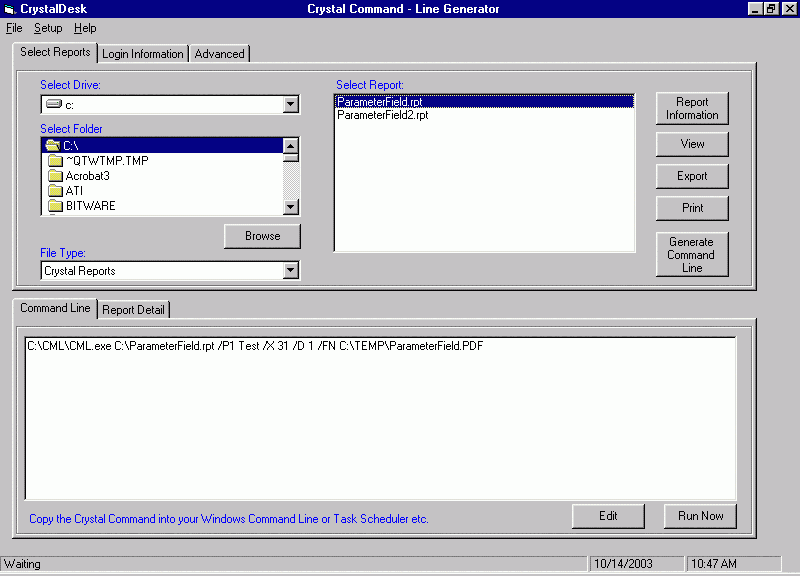
Sample commands created by the Command Line Generator
View a report with No Login Information and No Parameters.
C:\CML\CML.exe
C:\SourceReportFolder\MyReportName
Export to Excel format with No Login Information and No Parameters.
C:\CML\CML.exe  C:\SourceReportFolder\MyReportName /X 36
/D 1 /FN C:\TEMP\MyReportName.xls
Export to PDF format with Login Information, encrypted password and 2 Parameters.
C:\CML\CML.exe  C:\SourceReportFolder\MyReportName.rpt
/L1 MyODBCName,ReportDatabaseName,UserName,Password /P1 01/01/2002 /P2 MyParam
/X 31 /D 1 /FN C:\TEMP\MyReportName.pdf
Email a Report (MAPI) in PDF format with No Login Information and 1 Parameter.
C:\CML\CML.exe C:\SourceReportFolder\MyReportName.rpt
/P1 MyParam /X 31 /D 2 /ETO ToEmailAddress /ECC CcEmailAddress /ESB Report
Subject /EMS New report message
Email a Report (SMTP) in PDF format with No Login Information and 1 Parameter.
C:\CML\CML.exe C:\SourceReportFolder\MyReportName.rpt /P1
MyParam /X 31 /D 9 /ETO ToEmailAddress /ECC CcEmailAddress /ESB Report Subject
/EMS New report message
Use the download link below to download and install the full Crystal Command program.
 Download a 20-day trial version of Crystal Command version 9.0.63 (23 MB).
A recommended update is available for Crystal Command and should be installed after the initial full installation. The update eliminates errors and provides additional features. Please note that if you have registered Crystal Command, this update may reset your serial number and require a new registration key.
Download Crystal Command hotfix to update to version 9.0.6965 (477 KB).
On some computers, you may see one or more errors during installation or launching Crystal Command. If you get errors, please download this zip file and extract these files to the Crystal Command program directory (normally C:\CML).