

Report Miner Suite
SiteSurvey
The Report Miner SiteSurvey tool provides a quick overview of your Crystal Reports in an easy to use grid.
- Crystal Report file name,
- Crystal Report title,
- Revision number (as maintained by the Crystal Reports Designer program),
- Total editing time (as maintained by the Crystal Reports Designer program),
- Author (as maintained by the Crystal Reports Designer program),
- Last Revised by (as maintained by the Crystal Reports Designer program),
- File date and time,
- File size,
- Number of sub-reports used,
- Number of tables used,
- Number of groups used,
- Number of sections used,
- Number of objects used and
- Number of formulas.
Site Survey Sample
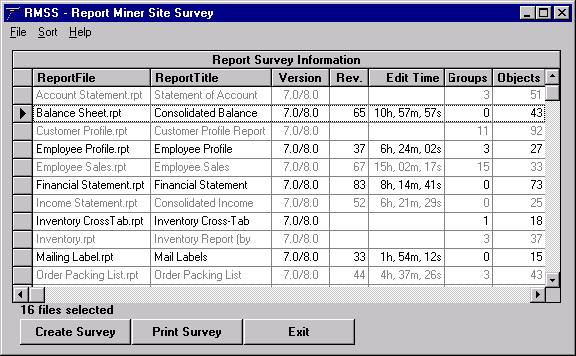
This survey lets you quickly review your Crystal Reports. The survey listing
can be sorted by any of the fields in either ascending or descending order,
providing listing from smallest to largest, oldest to most recent, number of
tables used, and so on.
How can I use SiteSurvey?
SiteSurvey provides a summary listing of available Crystal Reports which can be sorted and printed in any order, allowing you to
- easily monitor and control version number and file date/time to monitor report changes
- quickly assess the Crystal Report complexity based on the report metrics/statistics
- group reports by author (available only on network version of Crystal Reports),
- list reports by report title.
Who can use SiteSurvey?
SiteSurvey is intended for anyone with a need to review and/or monitor report files.
For developers, SiteSurvey is useful in monitoring and tracking version numbers and identifying the complexity of Crystal Reports based on metrics.
For managers and end users, SiteSurvey provides valuable metrics information indicating report complexity, and also allows basic update control information by providing revision number and total edit time.