

.rpt Inspector
Make consistent changes to multiple Crystal Reports at once
Need to create, edit, or open a .rpt file? You may need Crystal Reports.
For distributing Crystal Reports, try ReCrystallize Server for Crystal Reports, our quickest, easiest software ever for sharing Crystal Reports on the web.
Already using Crystal Reports software with multiple reports? Read about .rpt Inspector below.
Please note:
The current release of .rpt Inspector is compatible with 32-bit versions of Windows 2000, Windows XP, Windows 2003, and Windows Vista. To use .rpt Inspector with Windows 7, Windows 8, or later, we recommend installing .rpt Inspector in a virtual machine using Windows Virtual PC, VMware Workstation, Virtual Box, or similar software to provide a Windows XP or Windows Vista environment.
The version of Crystal Reports designated to work with .rpt Inspector must also be installed on the PC with .rpt Inspector. In our experience, Crystal Reports XI R2 will work with Windows 7, 8, and 10 and may be installed alongside a newer version of Crystal Reports. Crystal Reports XI R2 remains available for purchase.
Product Overview
Change text, formulas, parameters, fonts, colors, printers, set database location, and more in multiple Crystal Reports at the same time.
Modifying objects and their properties in one or many Crystal Reports is fast and easy with .rpt Inspector!
.rpt Inspector 3 Professional Suite is a "must have" tool for anyone using Crystal Reports. This ground-breaking, time saving add-on for Crystal Reports will save you hours or even days. What should be a simple task, making consistent changes to one or more reports at the same time, is a daunting, time-consuming, and error prone process without .rpt Inspector. With .rpt Inspector, making changes to multiple Crystal Reports takes only minutes and is more consistent and reliable than making manual changes to each Crystal Report separately.
Your ROI is immediate. Even the simple task of standardizing all fonts (change all Arial to Times New Roman) in 30 reports could take an average report designer about 15 minutes per report--nearly 8 hours combined. Add to that the time it takes to do any number of other tasks, such as to standardize parameter default values across the same reports. Before you know it, you've spent more money doing it the old fashioned way -- one report at a time. Or you could have used .rpt Inspector and accomplished the same work on all 30 reports (or even 300+ reports) in less then 15 minutes combined. .rpt Inspector continues to provide value with each use, quickly paying for itself many times over.
Unlike the Crystal Reports designer, .rpt Inspector allows you to open one, two, a hundred, or even several hundred reports all at the same time!. You can use the tools in .rpt Inspector to find and filter in common objects and properties (formulas, parameters, parameter default values, text, headers, footers, size, driver, database, printer, and so on) across the selected Crystal Reports and modify them all at the same time with visual feedback.
With .rpt Inspector you can modify:
- Database Location
- Colors
- Alerts
- Fonts
- Report Settings
- Graphs
- Parameters
- Formatting
- Formulas
- Printer Settings
- Text
- Conditional Formatting
and hundreds of other settings in your Crystal Reports

Put the pieces together and solve the Crystal Reports editing puzzle with .rpt Inspector.
- Supports Crystal Reports versions 8.5, 9, 10, XI, and XI Release 2.
- Data source / Database Migration and Conversion - Set Location, Convert Driver
- ODBC / OLE DB and Native DB2, Informix, Oracle, SQL Server, Sybase support
- Open an entire folder of reports (including sub-folders) with one click
- Now fully supports sub-reports
- Standardize parameter default values
- Copy parameter default values from source to one or more destinations
- Search and Replace
- Report Lists
- Drag and Group
- Multiple Report Preview Windows
- Open even more reports, faster
- Spell Checker
- Dockable and Floatable window panes and menus
- Customizable layouts
Data source / Database Migration and Conversion - Set Location, Convert
Driver, Verify Database
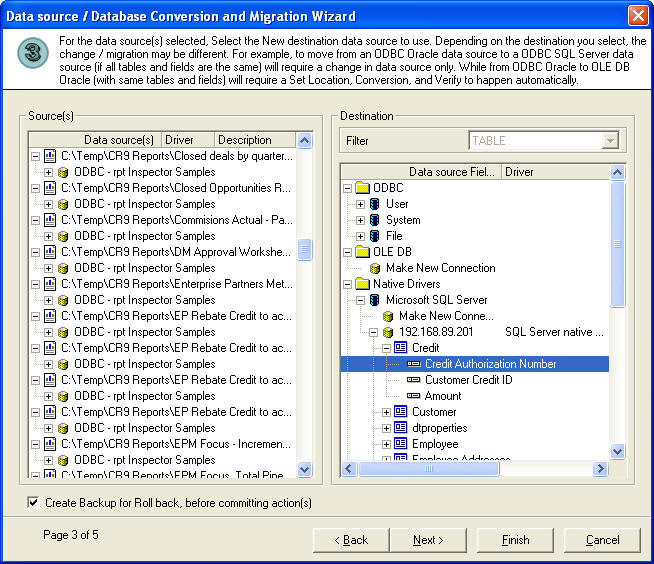

The wizard now supports set location, convert driver, and verify database on one or many reports at the same time. Now also supported are ODBC / OLE DB / Native DB2 / Native Informix / Native Oracle / Native SQL Server / Native Sybase.
You can literally change hundreds of report's data sources / databases, and update field mappings in minutes.
ODBC / OLE DB / Native DB2 / Native Informix / Native Oracle / Native SQL Server / Native Sybase - product wide support
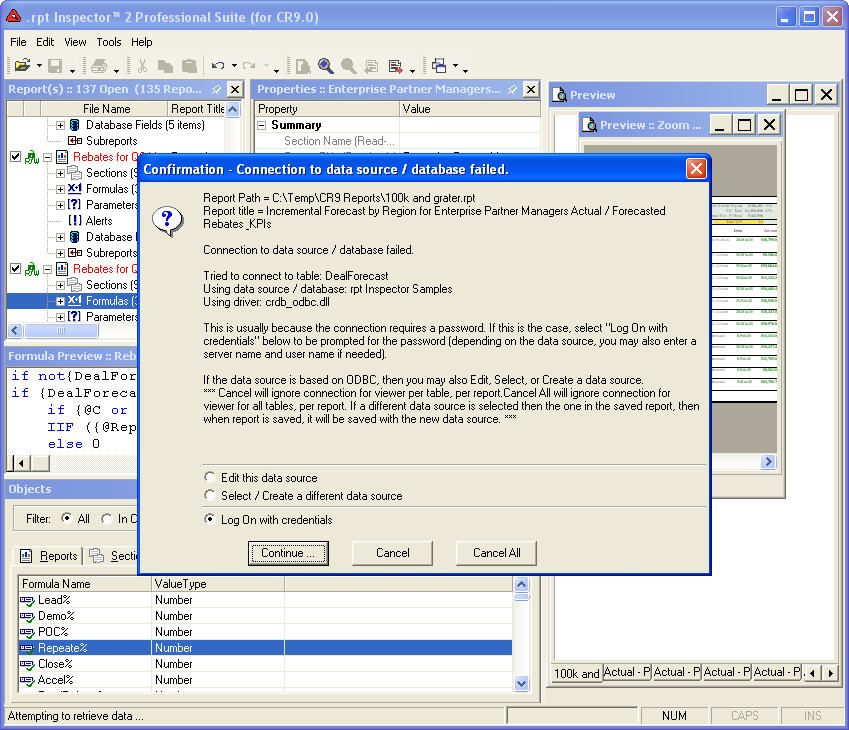
Now when enabling the preview viewer and making a connection to a database, you'll be prompted to enter a user id and password if necessary on all supported connectivity methods. Connectivity methods that require more information than a user id and password (OLE DB and Native drivers) are also completely supported.
Standardize parameter default values
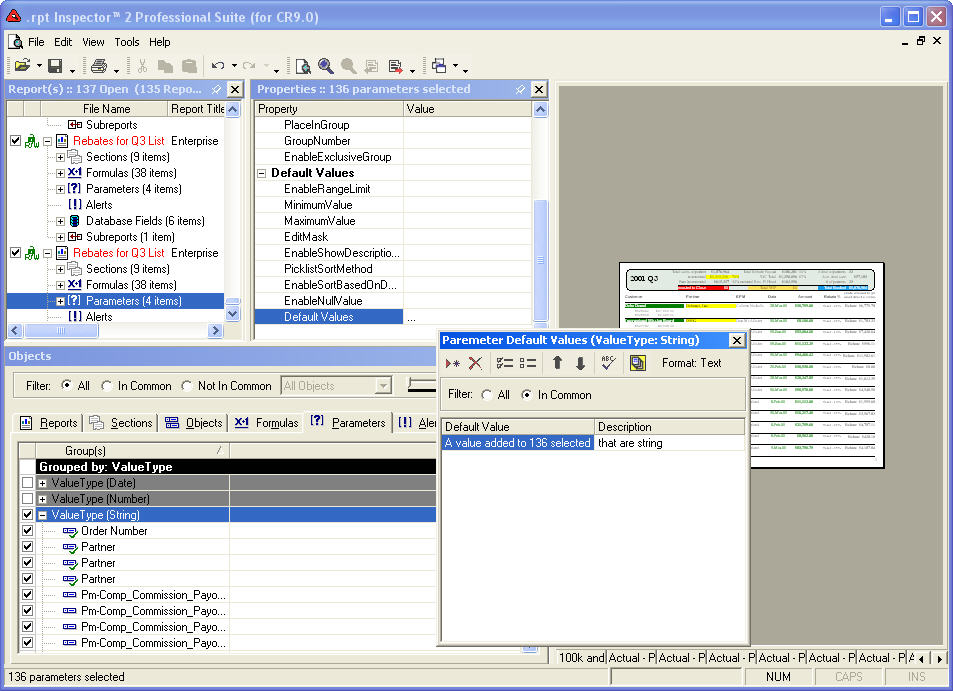
It's now easier than ever to standardize and update your parameter's default values. With the redesigned Parameter Editor (default values editor), you can select multiple parameters across one or many Crystal Reports and can append or overwrite default values with ease.
Copy parameter default values from source to one or more destinations
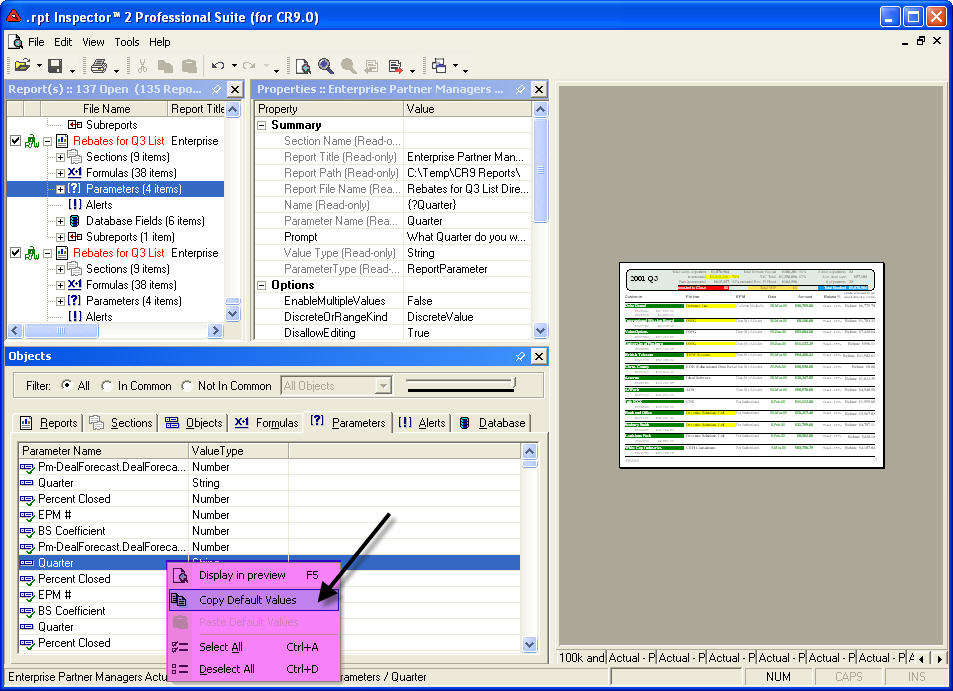
Another new way to work with parameter default values is our one-to-many copy relationship. This allows you to select your source, copy its values, and paste them to as many destinations as necessary.
Search and Replace
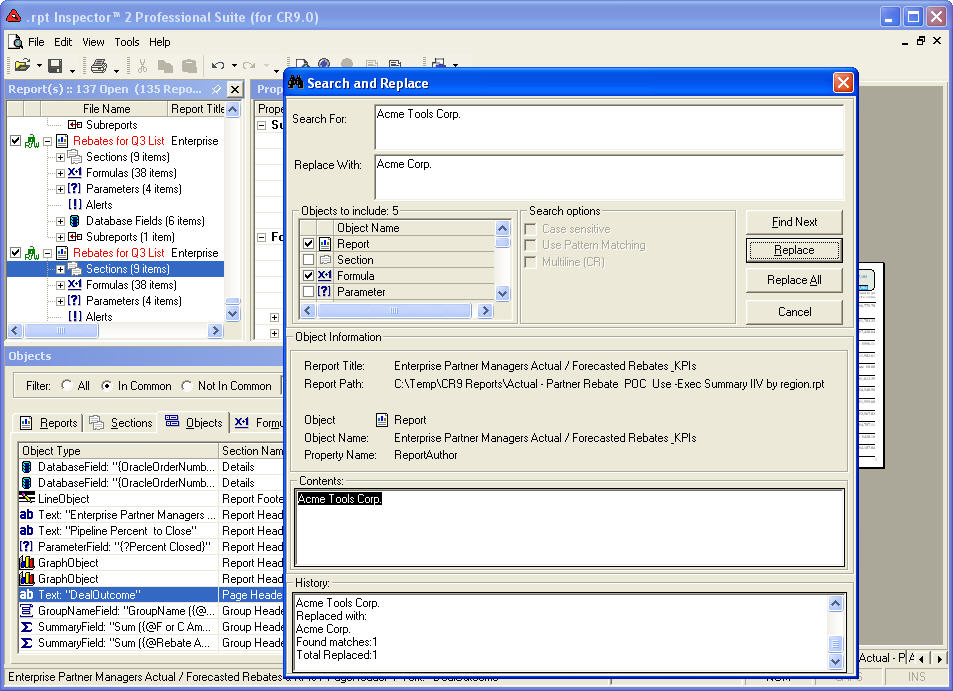
Looking for a specific text but not sure of all the places it resides (text objects, parameter objects, formula objects)? It's easier than ever to find what you're looking for and/or replace it with something else. You can even fine tune your search by specifying which objects to search.
You can take advantage of pattern matching search which uses regular expressions.
Report Lists
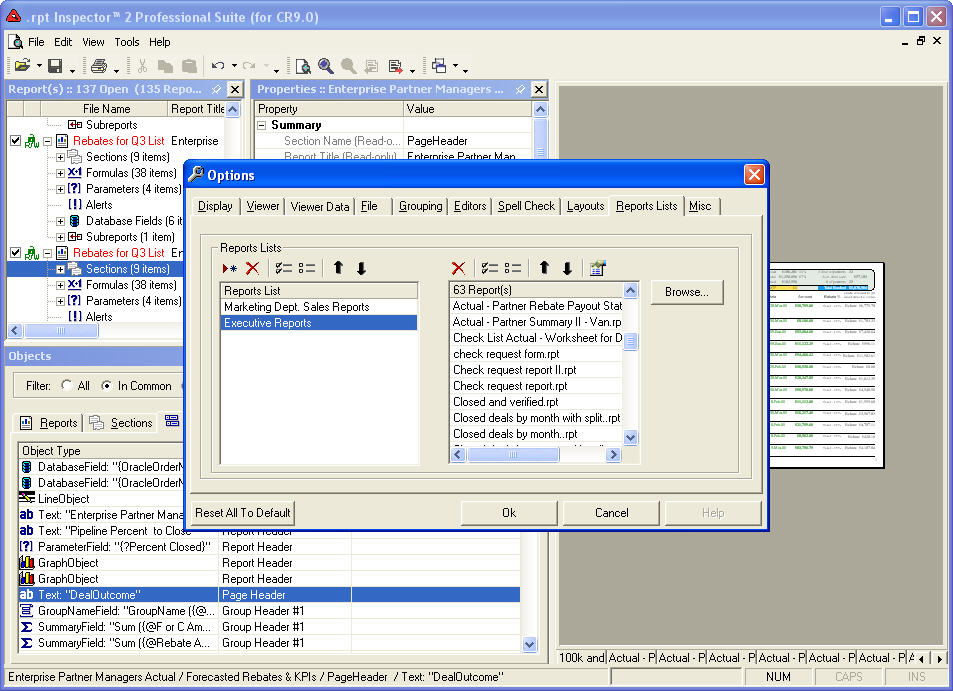
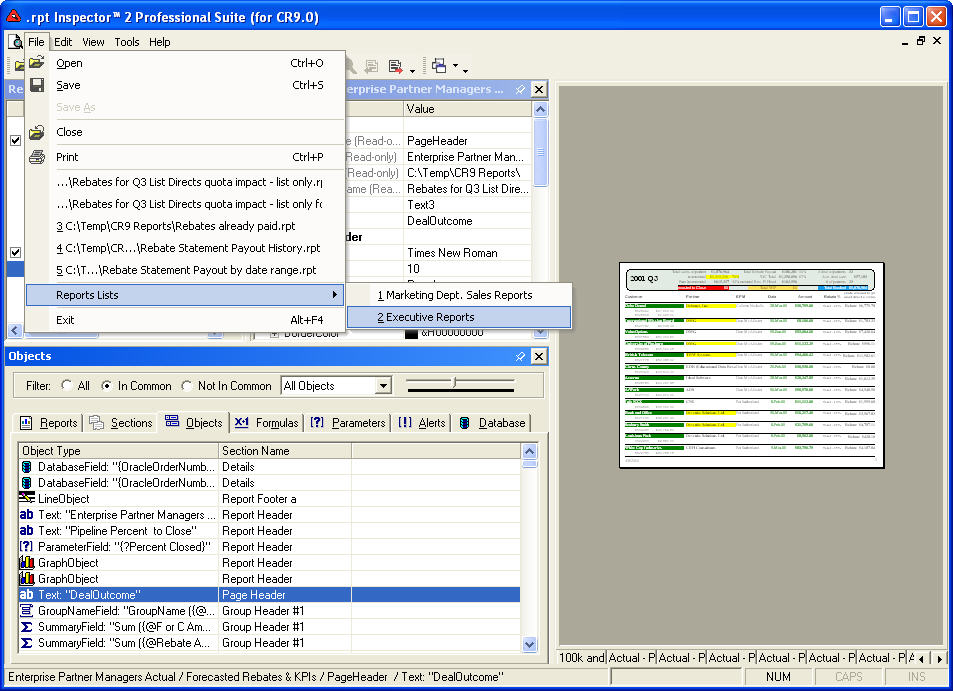
Do you work with the same sets of reports? You no longer need to open them one at a time. Even if you select multiple reports in the open dialog, you'll love this feature.
Just like an MP3 playlist, you can create a virtually unlimited number of Report Lists. Add to each report list any number of Crystal Reports you'd like, from any directory on your system or from mapped network drives.
Click on a report list and it will automatically open all reports in the list.
Drag and Group
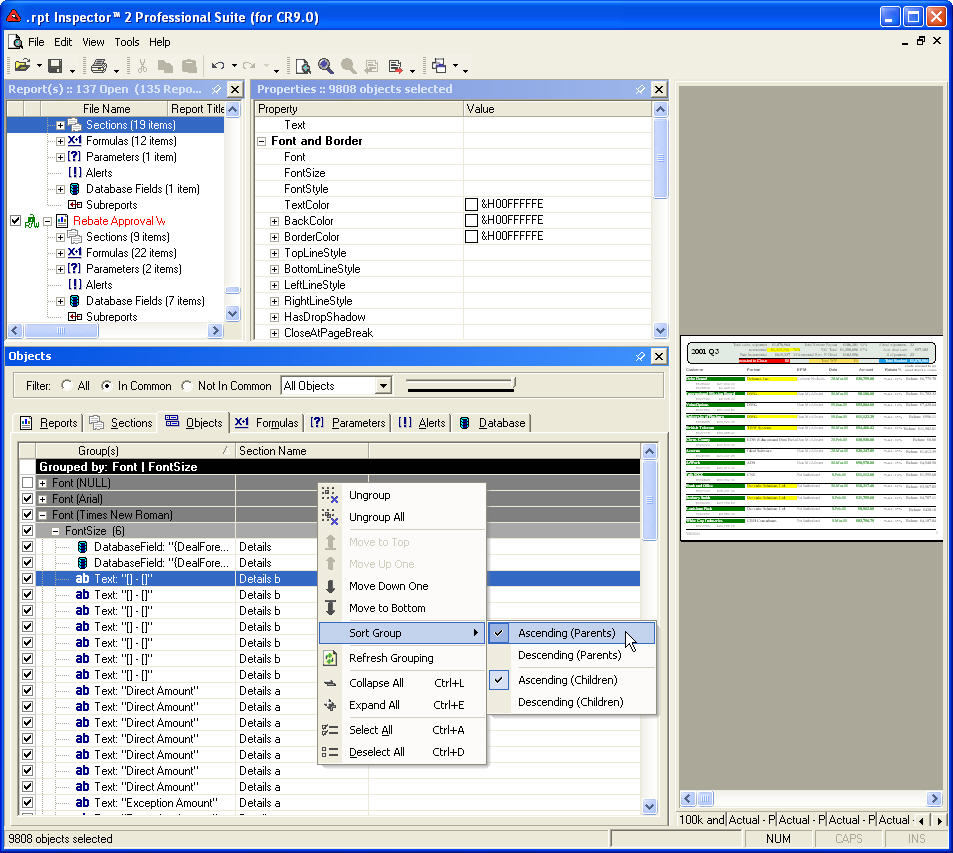
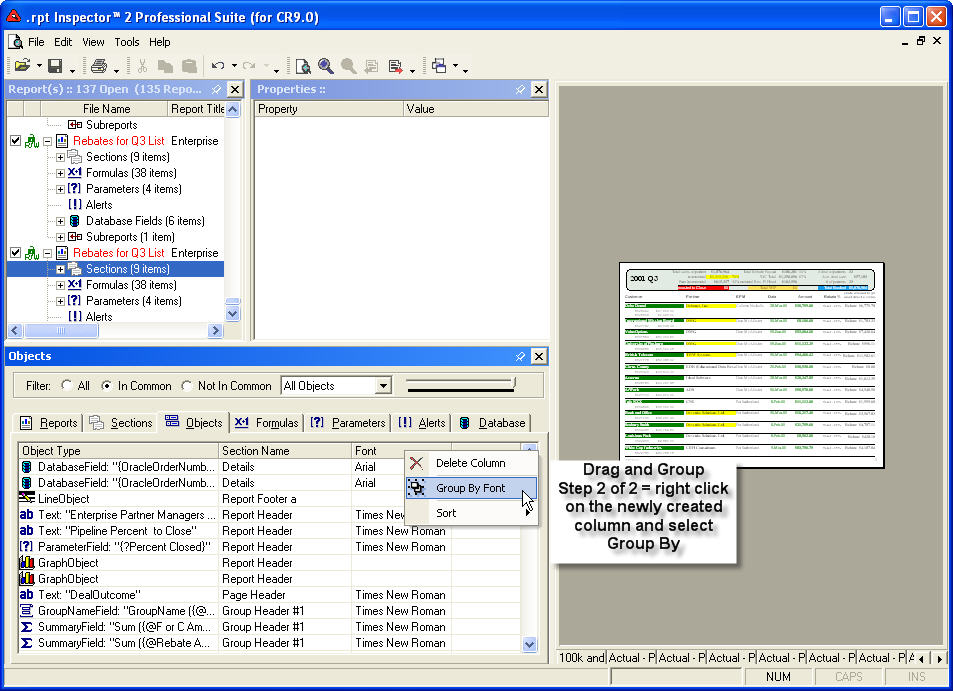
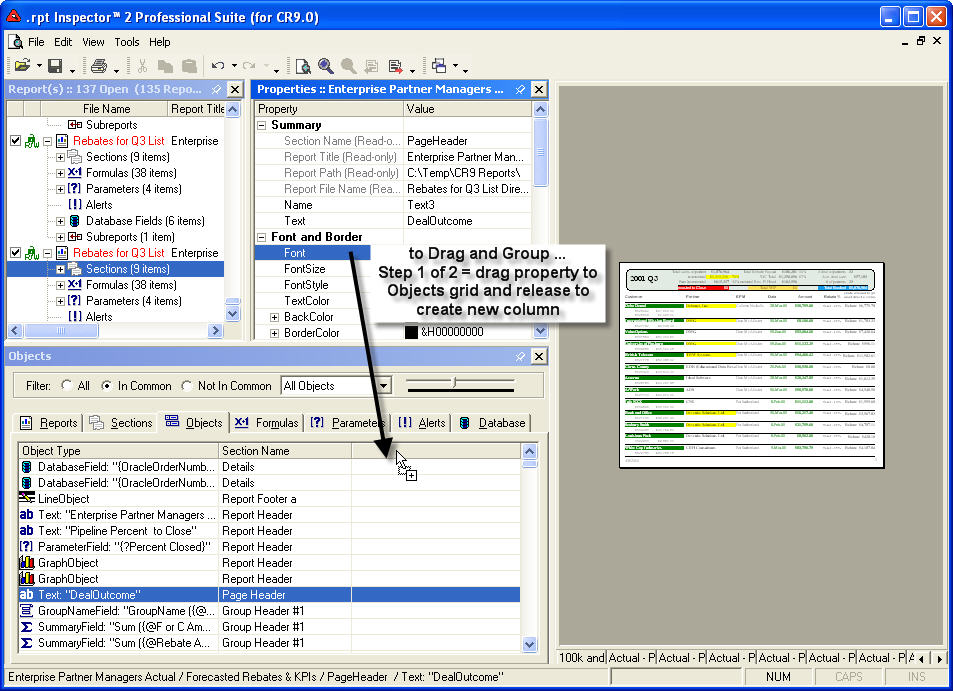
Originally introduced in version 1, our patent pending technology allows you to quickly and easily analyze properties across objects and reports. Drag and Group is the concept of selecting item(s) in the Objects pane, and dragging one or more properties from the Property pane back to the Objects to create a new column. Then right clicking on the column header and selecting group by object name (where the object name is the name of the column; i.e. font; font color, formula, etc.). The result is a pivot view.
We've further optimized performance on grouping and moving items within the groupings (top / bottom / up one / down one). Plus we've exposed the grouping level color configuration and added support for auto-refresh of groupings.
Multiple Report Preview Windows
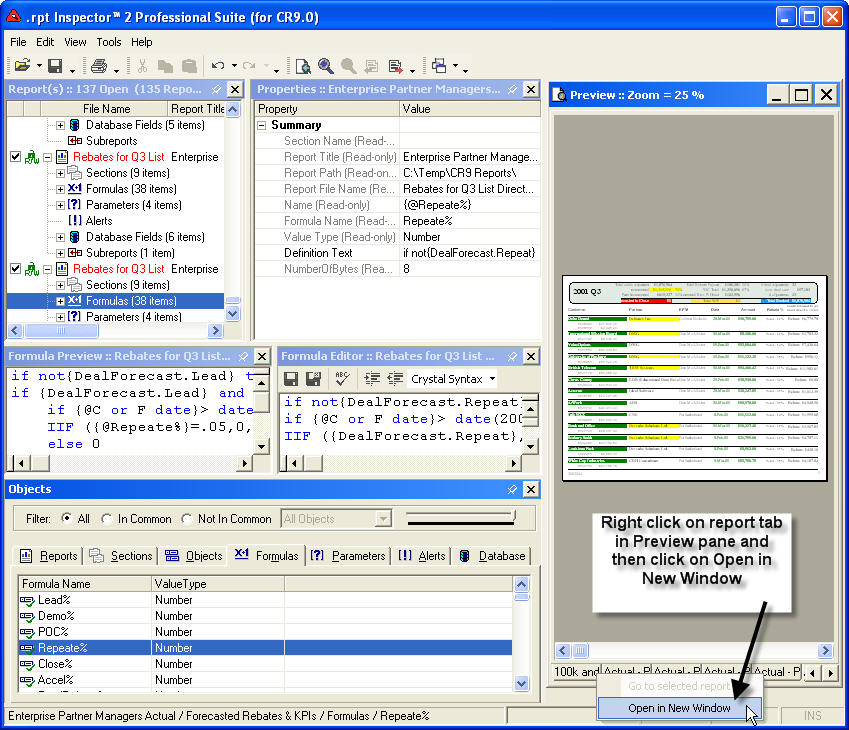
We've even enhanced our preview viewer. In addition to showing you open sub-reports as a separate tab (configurable in TOOLS | OPTIONS), we have now given you the ability to open a virtually unlimited amount of preview windows. Simply right click on one of the report tabs in the preview viewer pane and select Open In A New Window open.
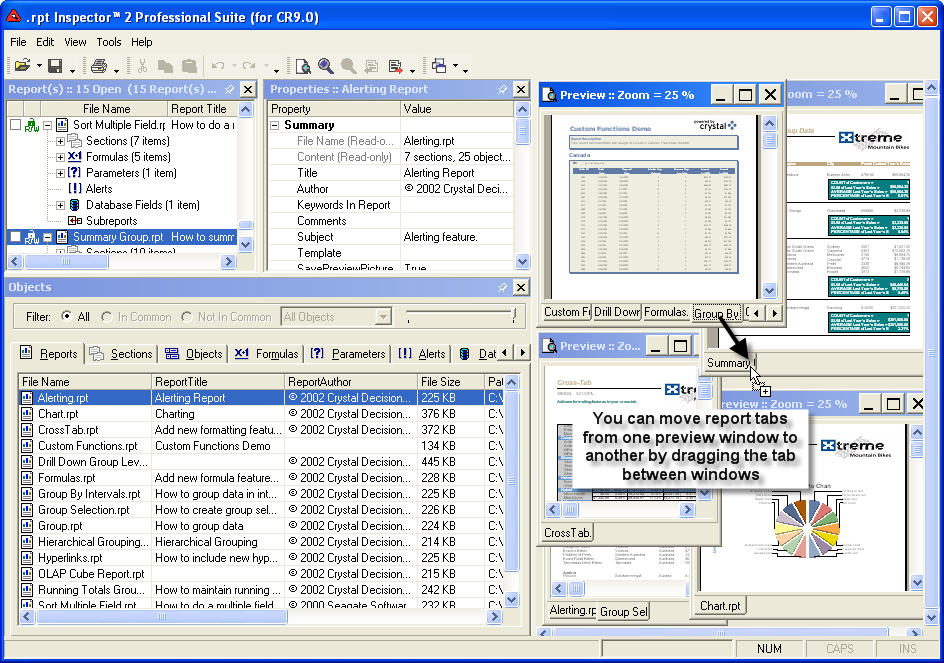
But we didn't stop there. You can drag and drop the report tabs between all open preview windows. And if you want your sub-reports to automatically follow, turn it on in TOOLS | OPTIONS.
This powerful feature allows you to quickly and easily see your changes come to life to multiple previews at the same time.
Spell Checker
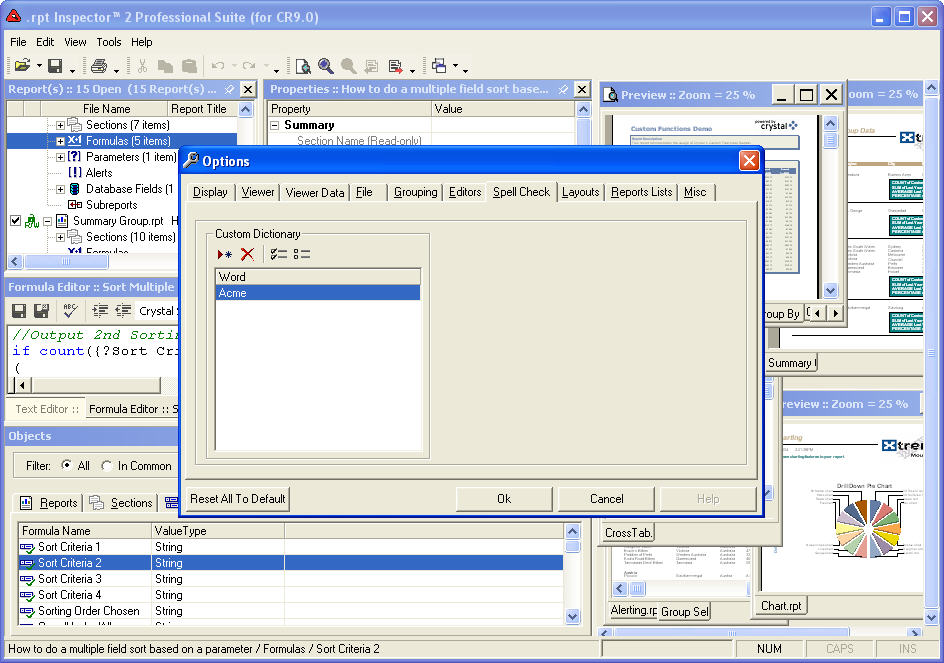
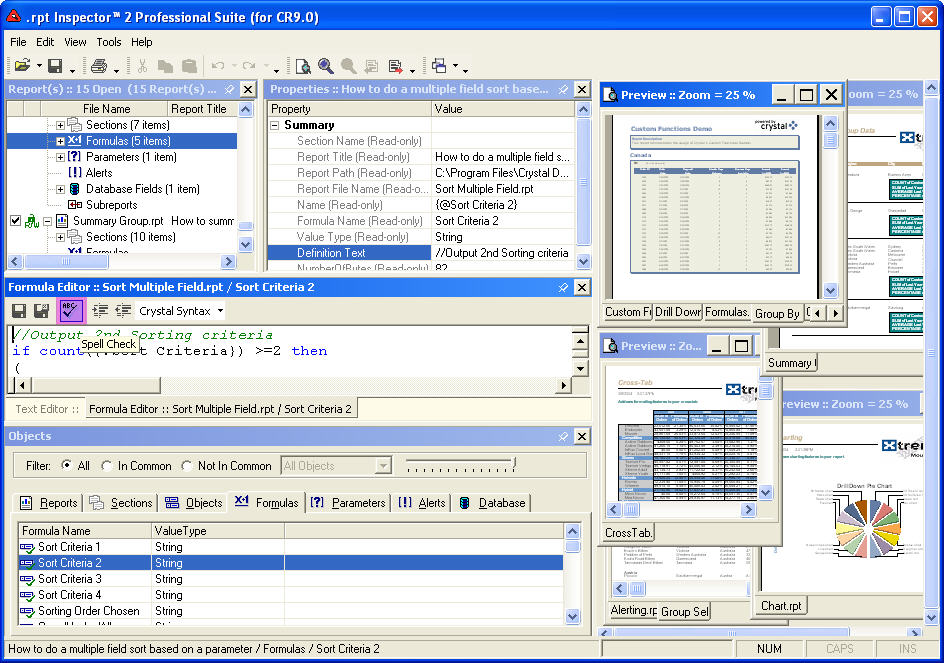
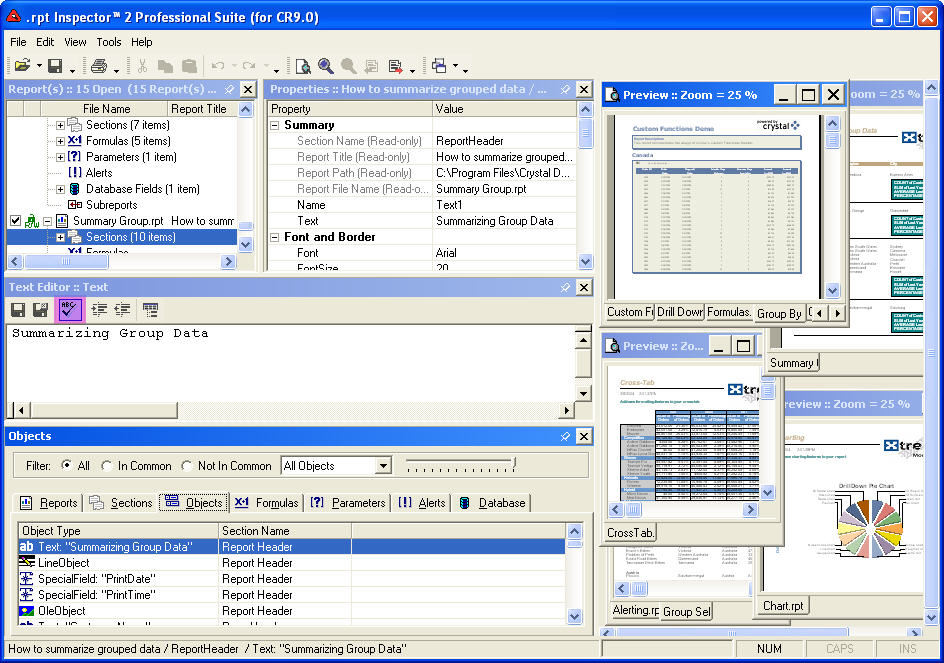
Now you can spell check your text and even add custom words to the dictionary. No more embarrassing typos. Spell checker is available in Text, Formulas, and Parameters editors.
Dockable and Floatable window panes and menus
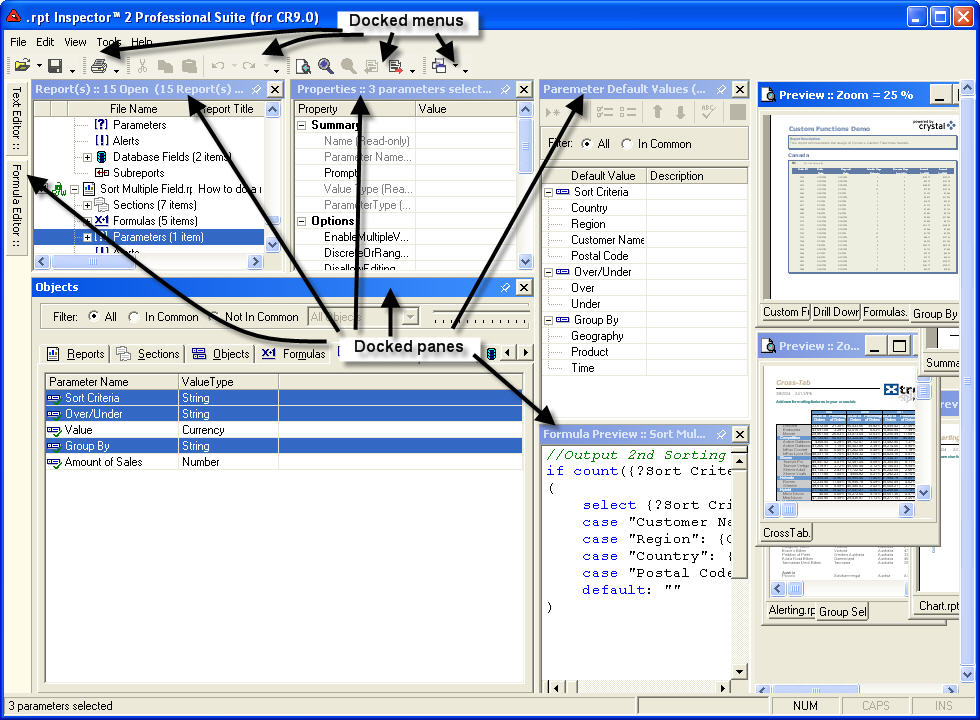
We've completely redesigned the foundation of .rpt Inspector to be faster and easier to use. All window panes and menus are now dockable and floatable. This gives you ultimate control of the user interface to customize as you see fit.
Many editors (text, formulas, parameters, etc.) have also been redesigned to support docking.
Customizable layouts
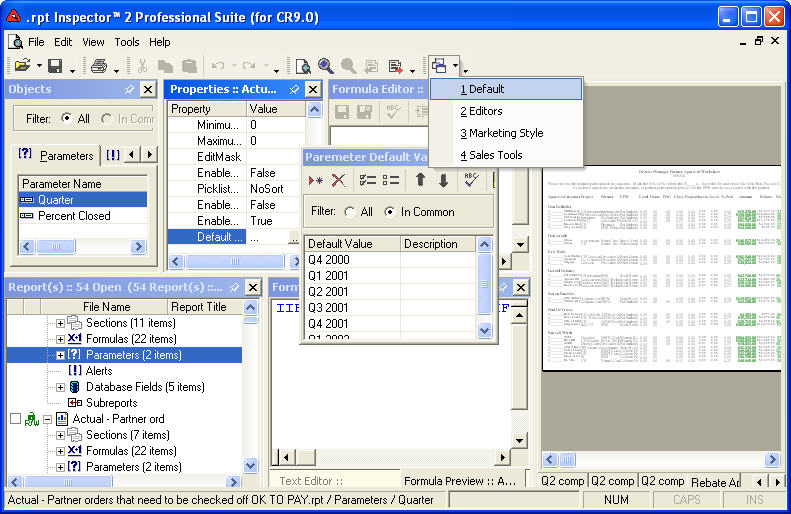
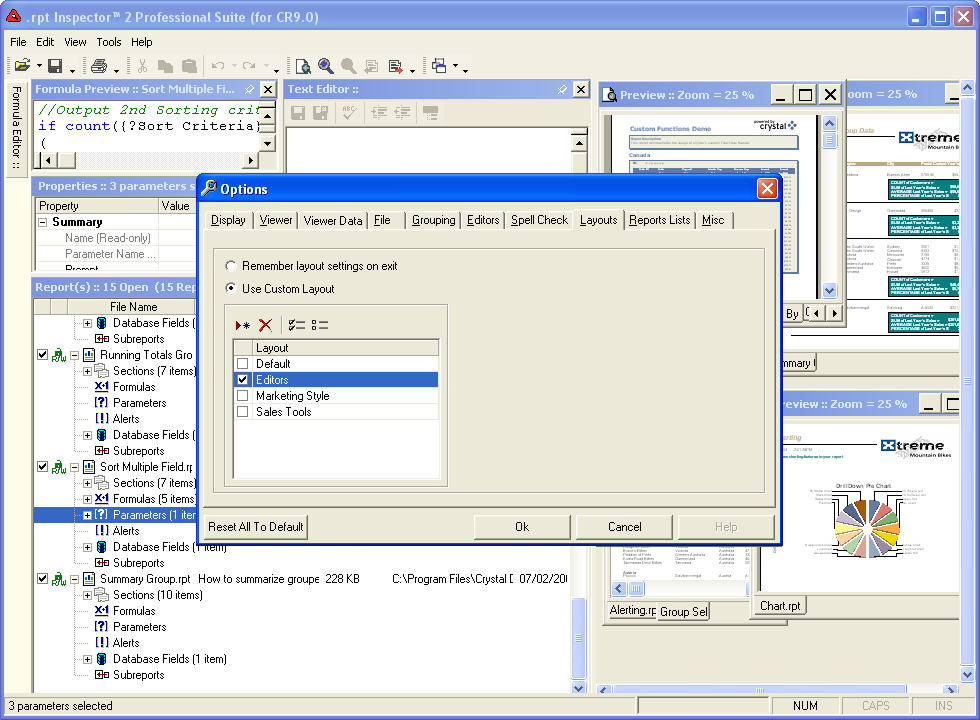
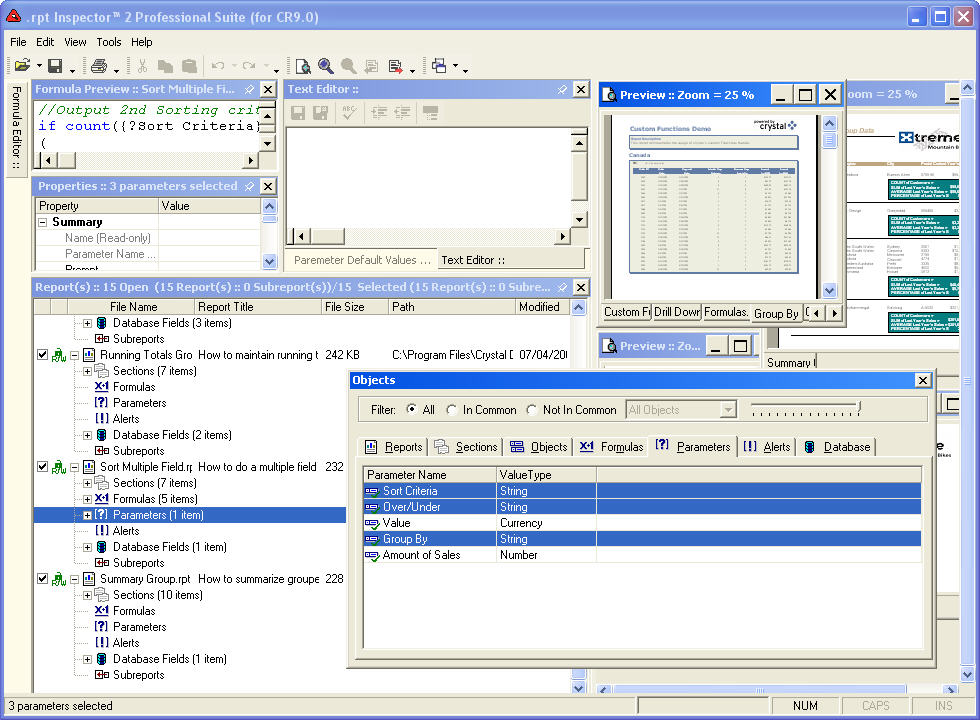
With our new dockable and floatable window panes and menus, you'll want to customize the layout that suits you best. So we've given you the ability to save a virtually unlimited number of customizable layouts that you can quickly and easily switch to on the fly.
But don't worry. It's easy to return back to the default layout at anytime.
"I'm just climbing into .rpt Inspector and it looks awesome! You weren't kidding about the ease of use. I'm firing away and using the power within 30 minutes. It's fast becoming an indispensable tool for me."
Shirley Richardson, Atlanta, GeorgiaChange Multiple Reports
Believe this! The quest to make targeted and precise changes across multiple reports can become a reality. Use .rpt Inspector's technique called "Grouping" to make changes to any individual report detail across any number of reports. Make a change to a text field, like your company name, and nothing else will move or change. You are empowered to make quick, focused, and specific changes across multiple reports. .rpt Inspector's editing features will shave hours off your current reports editing process.
Standardize Reports
.rpt Inspector makes it easy to standardize any section of your reports. Let's say your legal department has changed the company disclaimer that appears in the footer section of all your reports. "Business as usual" requires you to open each individual Crystal Report to update the disclaimer. With .rpt Inspector you change all the disclaimers, in all the footers, all at the same time! Just target the disclaimer text in as many reports as you select and make the change. It's that quick and easy. Improve productivity by targeting any of the hundreds of object properties to make specific, focused changes to any or all of your reports.
Find Report Errors

Step up and compare reports and/or single out very detailed information using .rpt Inspector's grouping technique. For example, a group of reports may utilize a specific formula with the same name. Several of them are giving strange data that doesn't agree with the majority. By sorting and grouping on the formula name you can now view every report using that formula and compare the formula syntax for accuracy. If an error is found it can be corrected in minutes. Use this feature to audit, debug, or find and correct errors in all your reports
Maintain Accuracy
Focus on the specific properties you actually want to change and preserve the accuracy of all your reports. Never again will you accidentally move the text while selecting a change and completely disrupt a report. Stay on the path with .rpt Inspector and change only your targeted items, never affecting any other aspect of the reports.
Cost Effective
.rpt Inspector typically pays for itself the first time you use it. The price of the product runs less than the cost in time and productivity to make one small change the old way.
.rpt Inspector Is A Cinch To Master

Any Crystal Reports user can quickly master .rpt Inspector. We are here for you if you need help. Our full menu of support basics can demystify the process of editing multiple reports. The online tutorials make the learning easy. Investigate the product. Watch the 5 minute tutorial overview and you too can get the hang of .rpt Inspector. We include a wide range of common task tutorials such as changing fonts, formulas, and printer settings. The tips and tricks guide will help you discover how to take advantage of duplex printers or teach you how to ready your reports "to step up" to Crystal Enterprise. Our detailed user instruction and reference guides, together with the on-line email support, make .rpt Inspector a cinch to master.
"It's everything you said it was. Surprisingly quick changes and an easy interface. You've really come through with a winner."
Gordon Lake, Minneapolis, MinnesotaSupported File Formats
.rpt Inspector Professional Suite for Crystal Reports versions 5 - 8.5
Read - Crystal Reports versions 5 through 8.5 .rpt files.
Write -
Crystal Reports version 7/ 8.x .rpt file format.
.rpt Inspector Professional Suite for Crystal Reports versions 9 - XI R2
Read - Crystal Reports versions 5 and higher .rpt file format, up to
your Crystal Reports version.
Write - Your Crystal Reports version .rpt
file format , readable by Crystal Reports 9 and higher.
System Requirements
- Windows 2000, XP, 2003, or Vista 32-bit Only
- Windows 7 installations may use Windows XP Mode for compatibility.
- For Windows 8 or 10, please use a virtual machine to run a supported version of Windows.
Native compatibility with newer Windows and Crystal Reports versions will be available in the next release.
Valid Licensed Copy of Crystal Reports 8.5, 9, 10, XI or XI R2 installed prior to installing .rpt Inspector.
.rpt Inspector works with these Crystal Decisions / Business Objects products
Crystal Reports Standard, Professional, Developer, Advanced, Server versions 8.5, 9, 10, XI and XI R2.
Business Objects Enterprise XI and XI R2.
Crystal Enterprise 9 and 10.
Most OEM Versions of Business Objects Enterprise, Crystal Enterprise, and Crystal Reports 8.5 - XI R2.
You can also use .rpt Inspector with reports created in Crystal Reports 2008, 2011, or 2013.
Work is underway on new releases of .rpt Inspector with full native support for newer Crystal Reports versions. Until new .rpt Inspector versions are released, use .rpt Inspector for Crystal Reports XI R2 to work with newer Crystal Reports. This will require that you have a licensed copy of Crystal Reports XI R2 (available here) installed in addition to the newer version of Crystal Reports.
.rpt Inspector is designed to make changes to multiple Crystal Reports .rpt files at the same time.
To make changes to one rpt file at a time or create new reports, use the Crystal Reports designer.
To view rpt files, schedule automatic report updates, and more see our other products that work with Crystal Reports.
 Download
the .rpt Inspector product brochure.
Download
the .rpt Inspector product brochure.
Download a trial version of .rpt Inspector Professional Suite for your version of Crystal Reports.
Use the following Install Key to activate the trial version after installation.
RC00 - HKCK - XN8M - LJCE - SXL0
Trial is a fully functional product for 15 days, limited to 10 combined saves.
The selected version of Crystal Reports must be installed on the PC with .rpt
Inspector.
Crystal Reports 2008, 2011 or 2013 (coming soon)
.rpt Inspector and Crystal Reports XI R2 may be used with Crystal Reports
2008, 2011, and 2013 .rpt files until a new release is available. Please
note that this requires Crystal Reports XI R2 to be installed on the same machine
as .rpt Inspector. Crystal Reports XI R2 can be installed alongside newer
versions of Crystal Reports on the same computer.
Please
click here if you need
a license for Crystal Reports XI R2.
Download a trial version of .rpt Inspector Enterprise Suite for your version of Crystal Reports and/or Crystal Enterprise / Business Objects Enterprise.
Use the following Install Key to activate the trial version after installation.
RC00 - HKCK - XN8M - LJCE - SXL0
Trial is a fully functional product for 15 days, limited to 10 combined saves.
The selected version of Crystal Reports must be installed on the PC with .rpt
Inspector.
Crystal Enterprise / Crystal Reports version 9
Crystal Enterprise / Crystal Reports version 10